Staff bill without seeing your margins

When someone else bills — family, salesman, or a second counter — purchase cost must stay off their screen. Role-based access hides landing cost and margins while the counter stays fast on phone. You do not need a big chain for that day to arrive.

Last updated 2026-07-28

What this is

Staff roles in MaterialOS split what each person can see and do. Sales and inventory staff bill and move stock without purchase cost or profit margins. Owners keep cost data, minimum rates, and approvals. Five roles: owner, manager, sales staff, inventory staff, and accountant — gated server-side, not a polite UI hide.

Hide purchase cost at the counter

Sales staff see what they need to finish a bill — not landing cost or margin. That keeps the counter fast and your cost data off the shop floor, whether you hired help or a cousin is covering the till. Shared logins are how cement and steel margins leak in week one.

Five roles, not one shared login

Owner sees profit and settings. Manager runs day ops without default margin visibility. Sales staff bill on an assigned shop. Inventory staff handle stock requests. Accountant works payments, ledgers, and exports — not open sales. That matrix is the product, not a checkbox buried in settings.

Below-margin sales need your say (Growth and Pro)

Set minimum selling rates. When a sale would go under, Growth and Pro can queue an approval for owner or manager instead of hoping someone remembers the floor price. Starter still includes the five roles and margin hide; approvals wait until Growth or Pro.

Leave paper, then protect the till

First job is getting bills and udhaar off memory and notebooks. The day someone else holds the phone, roles become the reason you do not outgrow a one-phone app. MaterialOS is paid — 30-day Pro trial, no card — not freemium forever.
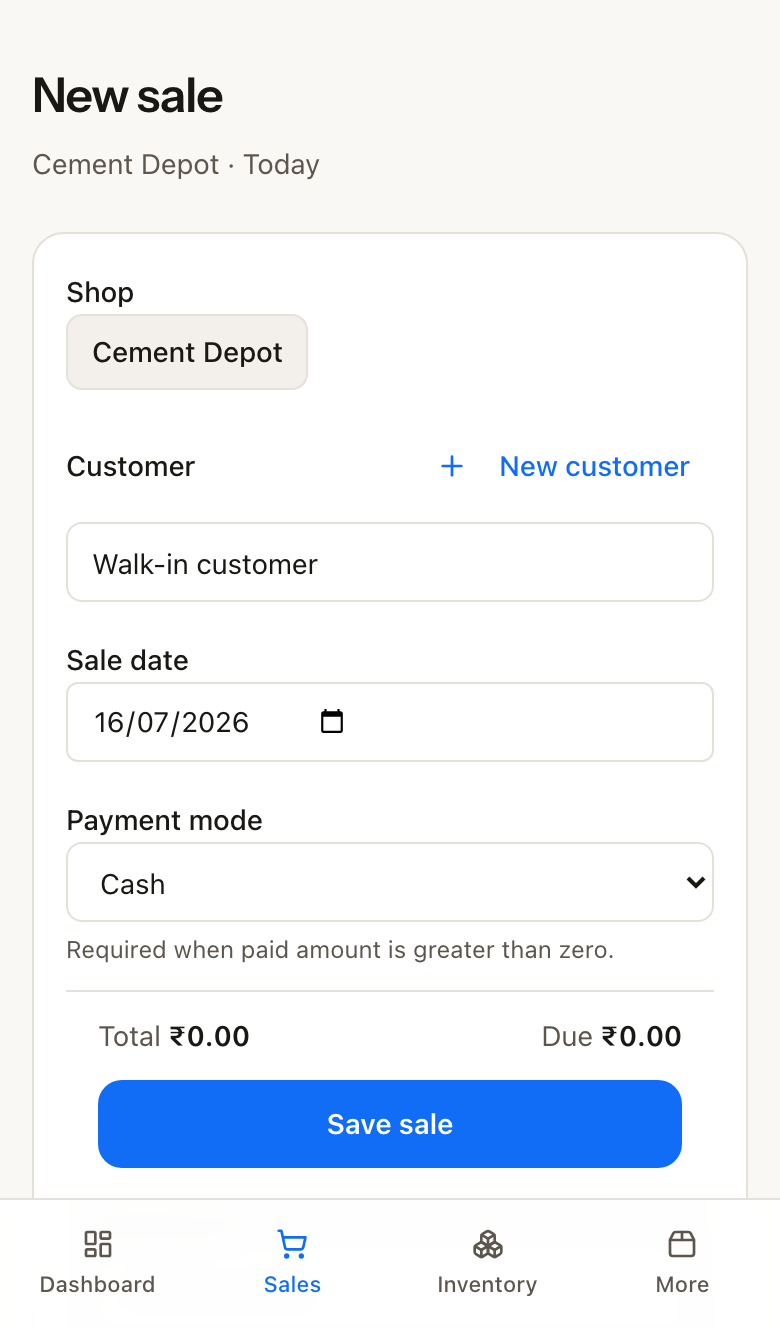
Staff new-sale screen on phone — bill the counter without purchase cost or margins

How it works

  1. 1

    Invite people with a role

    Add staff from settings and pick owner, manager, sales staff, inventory staff, or accountant. Only one owner account holds full margin visibility and business settings.

  2. 2

    Assign shop where it matters

    Sales and inventory staff stay on their assigned shop. Owner, manager, and accountant can work across locations when you have more than one counter.

  3. 3

    Bill on phone

    Counter users complete invoices without cost columns. You still see purchase cost on owner views and reports among the 14 reports on every plan.

  4. 4

    Approve exceptions on Growth and Pro

    Below-margin attempts and credit overrides can wait in an approval queue instead of silently shipping at a loss.

Plans and limits

All plans include the five roles and margin hide for sales and inventory staff. Approval workflow for below-margin sales and credit overrides is Growth and Pro only. Starter: up to 3 staff. Growth: up to 8. Pro: unlimited. List prices exclude GST (Starter ₹799/mo, Growth ₹1,799/mo, Pro ₹3,499/mo) + 18% GST at checkout. Annual marketed as 2 months free.

Roles protect cost data; they do not make MaterialOS a freemium solo khata app. No permanent free plan — 30-day Pro trial only. MaterialOS does not file GST returns. Signup today is building materials first.

If sales staff see purchase cost on cement and steel, you negotiate against yourself on every bill. Hide the cost. Keep the counter fast.

Akash Paul · CEO & founder

Questions

Can sales staff see what I paid for stock?

No. Sales and inventory staff do not see purchase cost or margins. Owner keeps cost visibility. Manager does not see margins by default.

What are the five roles?

Owner, manager, sales staff, inventory staff, and accountant. Each role is gated server-side — not just a UI toggle.

Do I need Growth for margin hide?

No. Margin hide for sales and inventory staff is on all plans. Growth and Pro add approval workflow for below-margin sales and credit-limit overrides.

Is this only for big multi-shop chains?

No. Even one shop needs roles the day someone else bills. Multi-shop filter and rollup are ready when you grow — Starter starts at one shop.

Try roles on full Pro for 30 days.

No credit card. Invite a sales login, hide purchase cost, and see how the counter feels before you pick a plan.

Start 30-Day Pro Trial